UsefulSoft
  Useful Software for Your System ...   
HomeMail UsUsefulSoft RSS 2.0 Feed DownloadOrderFAQSupport
Products
Print Censor
Compare Editions
What's new in 5.2
Screenshots
Documentation
History
FAQ
Print Informer
Screenshots
History
Remote Queue Manager
What's new in 5.1
Screenshots
History
PrintGhost
Screenshots
History
PropertyEditor
Screenshots
History
Quick Tour
Print Censor ME
Screenshots
History
Freeware programs

Subscribe to news
Email:
Visit this group
What's new in Print Censor 5.2:

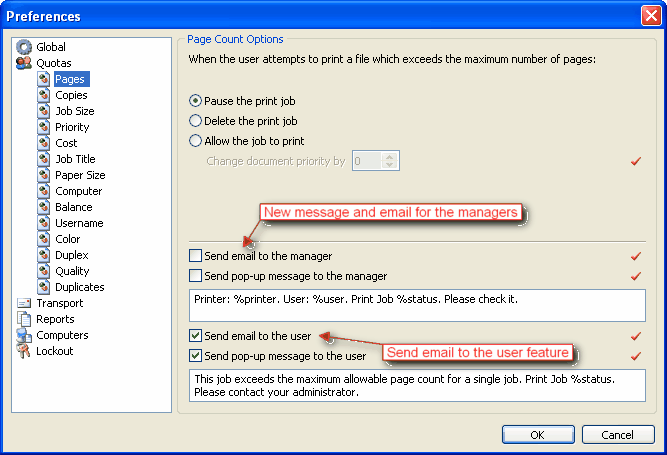
  New notifications for users and managers

  • Notification by email for user;
  • Notification by email for managers;
  • Pop-up message for managers

  • (click to enlarge)
     
      New duplicate printing restriction

    You can activate this restriction to prevent printing several copies of the same document.
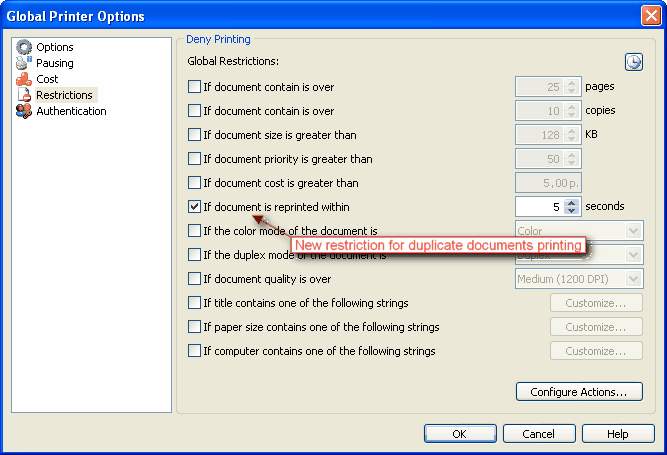
    Also you can customize time interval for checking duplicates.

    (click to enlarge)
     
      Use Active Directory emails feature

    Now you can use emails for notifications from Active Directory.
    When this option enabled you can't customize users emails.
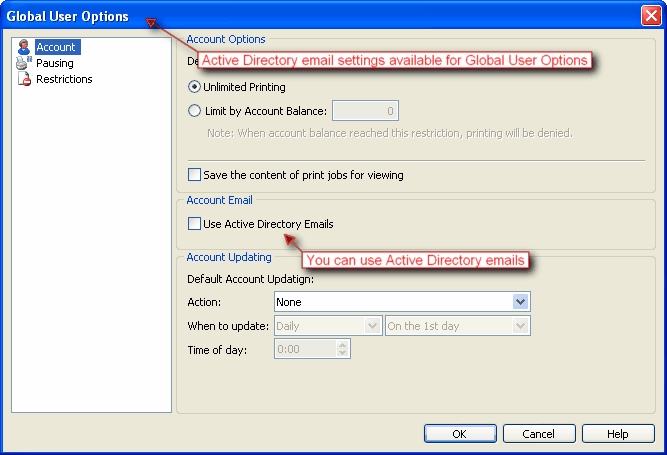
    (click to enlarge)
     
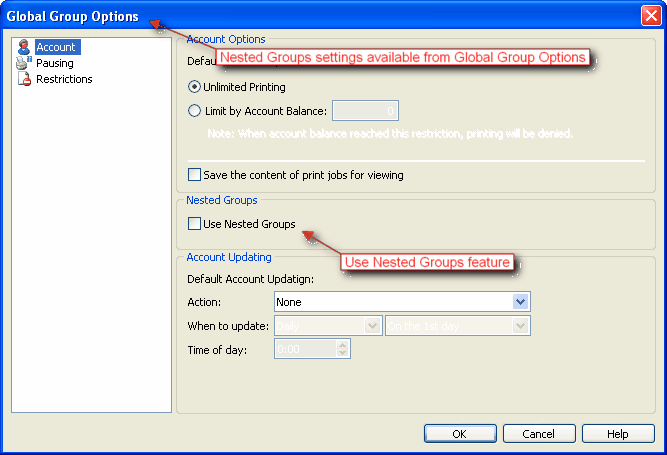
      Use Nested Groups feature

    Now you can use nested groups for quotas and restrictions.

    (click to enlarge)
     
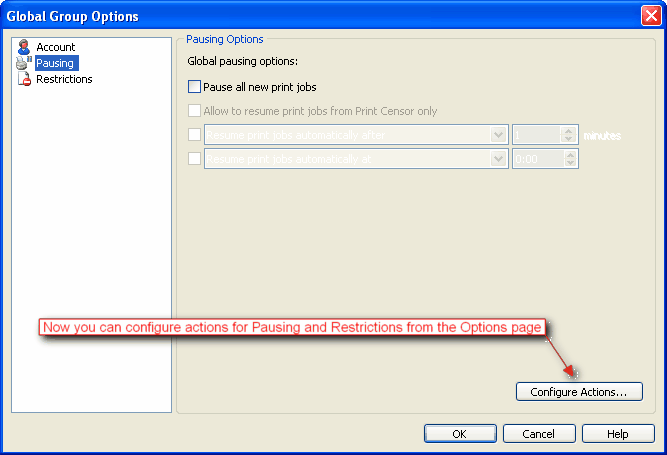
      Configure Actions feature

    Now you can Configure Actions for Pausing and Restrictions from the Options window.

    (click to enlarge)
     
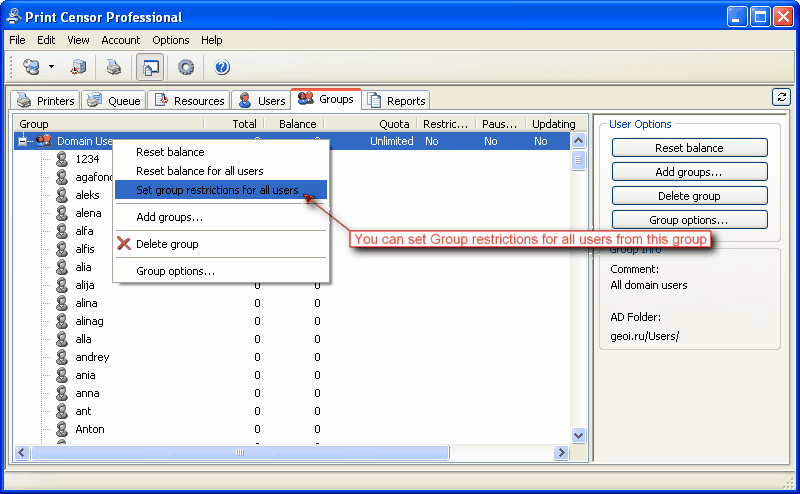
      Set Group restriction for All Users feature

    Now it is easy to set restrictions for all Users from the selected Group.
    Just select Group, expand it and click the command "Set Group restrictions for All Users".

    (click to enlarge)
     
    What's new in Print Censor 5.1:

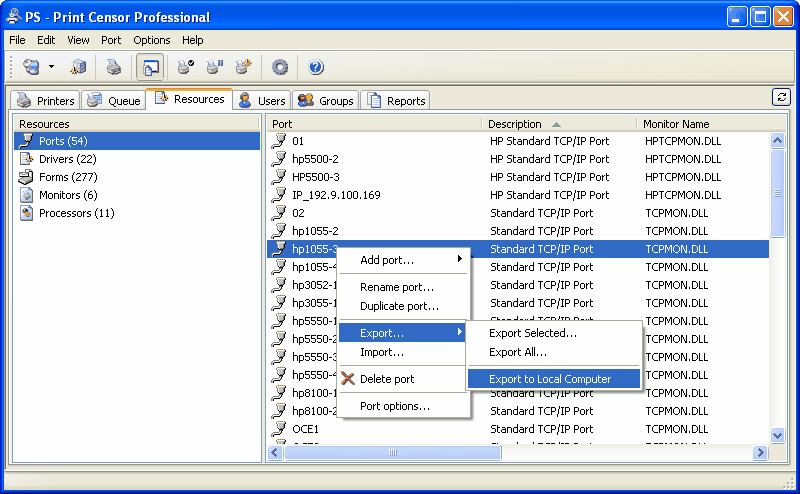
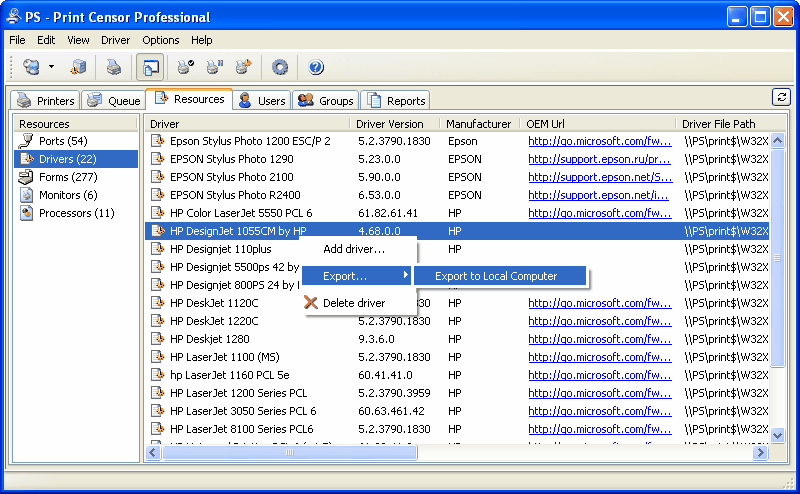
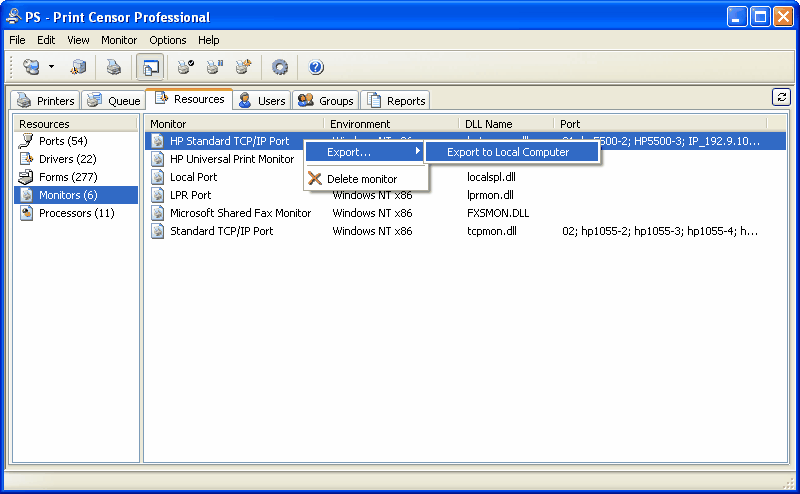
      New Resources page

    On this page you can work with:
    Ports, Drivers, Forms, Printer Monitors, Print Processors.

    On the Ports page you can:
  • Add new Printer Port;
  • Rename TCP/IP Port (unique feature);
  • Duplicate TCP/IP Port (unique feature);
  • Export and Import Printer Ports;
  • Export TCP/IP Port from remote to local computer;
  • Delete Printer Port

    On the Drivers page you can:
  • Add new Printer Driver;
  • Export Printer Driver from remote to local computer;
  • Delete Driver

    On the Monitors page you can:
  • Export Printer Monitor from remote to local computer;
  • Delete Printer Monitor

  • (click to enlarge)

    (click to enlarge)

    (click to enlarge)
     
      New interface of the Queue page with Printers Folders

    With new easy to use interface you can:
  • Create custom Printer Folders, for example for Plotters;
  • Create Folders for Computers and Domains;
  • Copy Printers to created Folders

  • (click to enlarge)
     
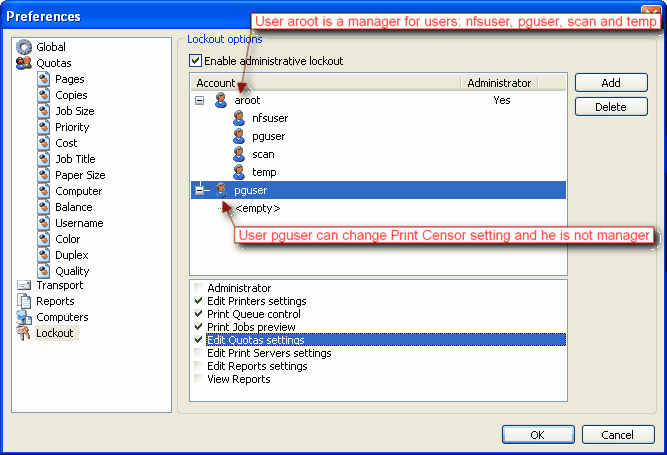
      New Lockout interface with support of the Managers

  • One user can be manager to other users;
  • One user can have several managers;
  • Manager can control and view print jobs for managed users.

  • (click to enlarge)
     
    What's new in Print Censor 5.0:

      Support of the Windows Cluster

    With Print Censor Enterprise Cluster Edition you can:
  • Save print jobs history for Windows Clusters;
  • Control unlimited number of the print spooler resources;
  • Authenticate users;
  • And more...

  •    
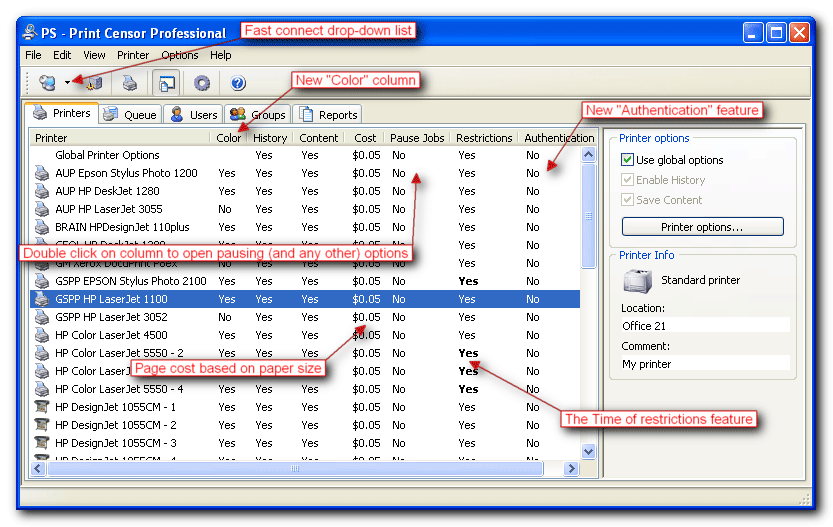
      New columns on the "Printers" page

  • Color column;
  • Authentication column;
  • Fast connect drop-down list;
  • Double click on any column to edit options;
  • Improved sorting

  • (click to enlarge)
     
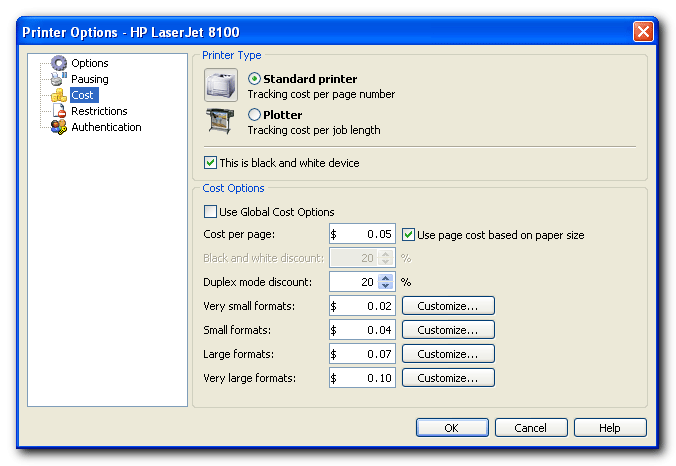
      Page cost based on paper size

    Now you can use different cost for different paper formats.
    Available for you:
    Very small formats; Small formats; Large formats; Very large formats.

    (click to enlarge)
     
     
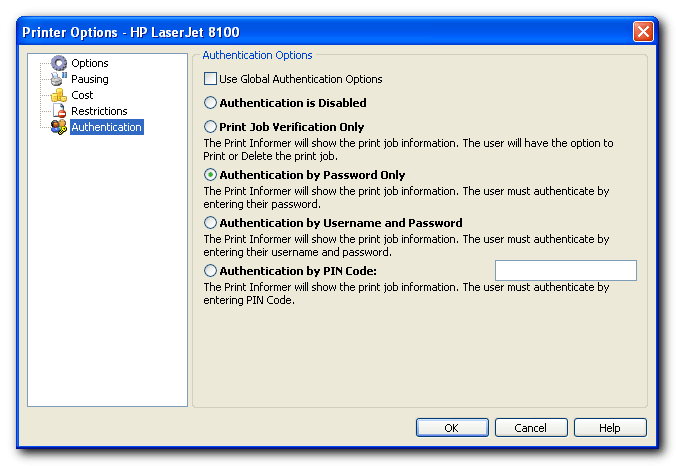
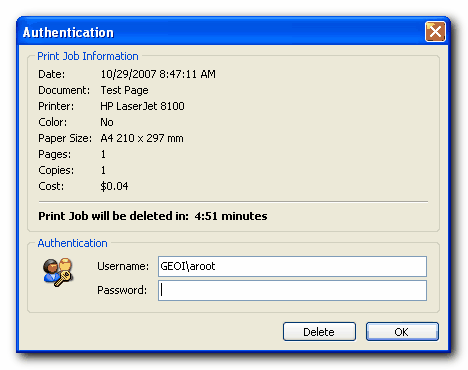
    Authenticaion feature

    With this new feature available for you:
  • Print Jobs Verification;
  • Authentication by Password;
  • Authentication by Username and Password;
  • Authentication by PIN Code.

  • (click to enlarge)

    (click to enlarge)
     
     
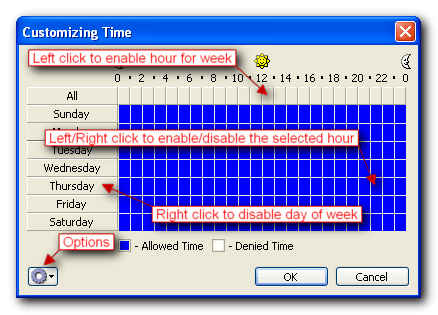
    The "Time of restrictions" feature

    Now you can customize time of restrictions.
    You can do it on the Customizing time window

    (click to enlarge)

    (click to enlarge)
     
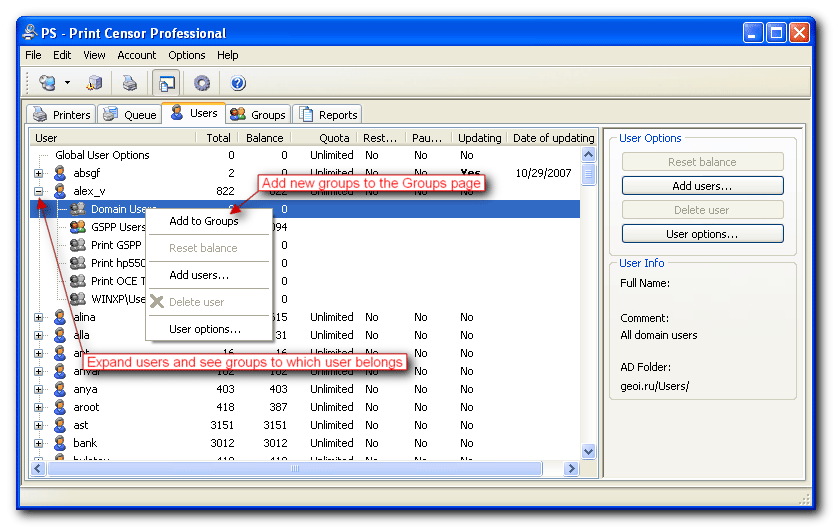
      Expanding users

    Now you can expang user and see groups to which user belongs.
    Moreover you can add this groups to the Group

    (click to enlarge)
     
     
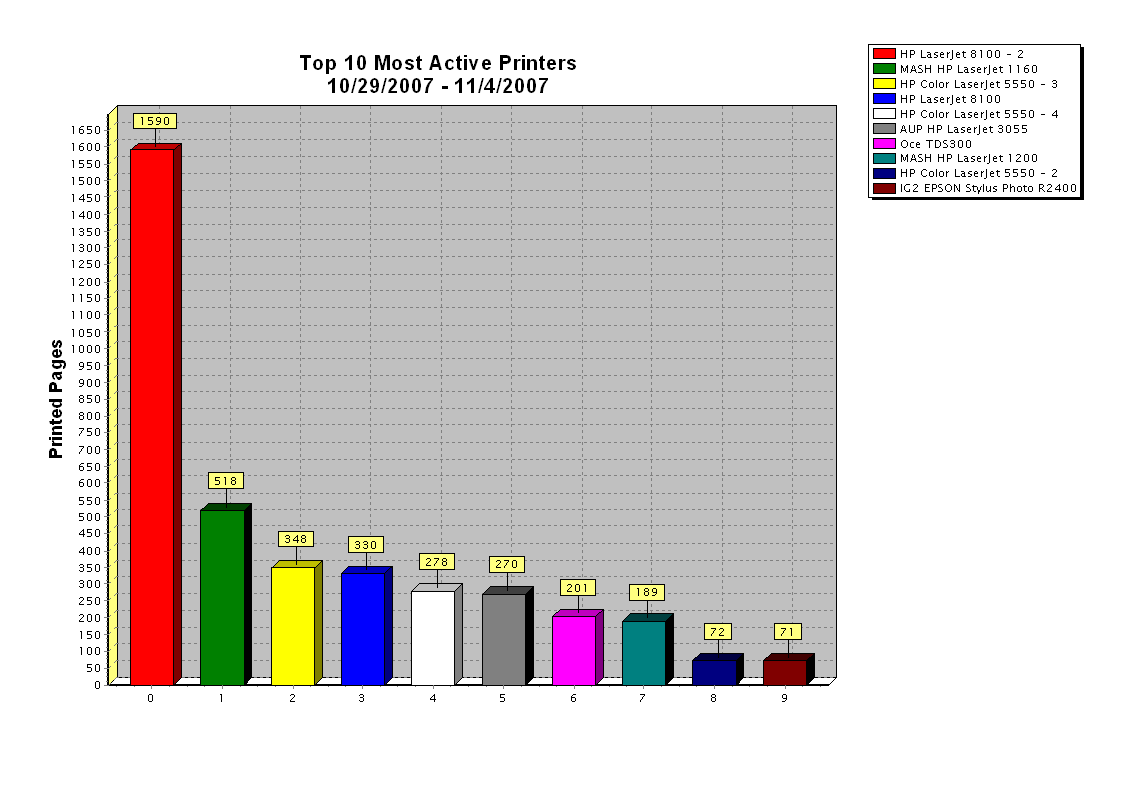
    Added new reports (on the Chart page)

  • Top 10 Most Active Printers;
  • Top 10 Most Active Users;
  • Top 10 Most Active Groups;
  • Top 10 Most Active Computers;
  • Top 10 Most Active Papers;
  • Top 10 Most Active Dates;
  • Top 10 Most Active Ports.

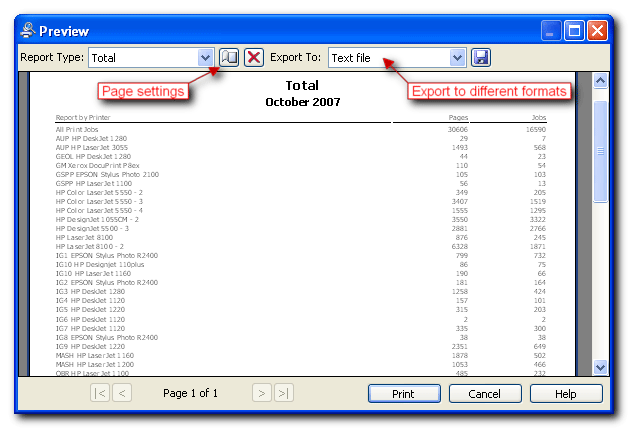
    Improved report preview interface.
    Added export to OpenOffice/StarOffice OpenDocument (Text Document and Spreadsheet).

  • (click to enlarge)

    (click to enlarge)

    (click to enlarge)
     
    Copyright © 2001-2010 UsefulSoft, Inc. All Righs Reserved.