|
|
|
Products
Follow Us
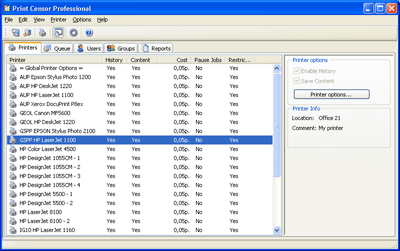
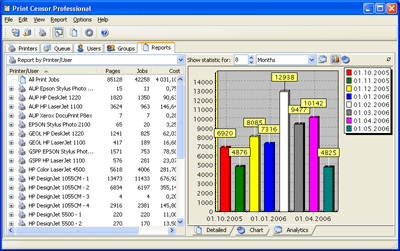
Printing... Tons of paper, cartridges that cost a fortune and never last, expensive man-hours spend to watch those printers work, servicing spendings and so on. Hard as it is, you can still agree to all that if it is to your company's general benefit. But what if instead of important documents your employee decides to print out a horoscope, or a recipe of some dish, or some personal letter. One can tolerate it to a certain extent, but what if that becomes a habit? Then it should be stopped and fast. Print Censor will help you to do that. Print Censor is an easy-to-use printer usage monitoring tool designed to record a printer's usage data and to simplify the management of network printers. Print Censor saves for you all useful printing information including user and computer names, document title and size, time & date of printing, number of pages and copies, priority, paper size, color of printing (colored or black and white), whether it was a duplex printing or not and print job cost. Nothing is left out and, any time you need it, all this useful information is at hand.Main Features
Printer usage analysisPrint Censor doesn't stop at mere analysis of printing data, it allows you to set printing quotas for groups and individual users and this makes Print Censor a really state-of-the-art program and a natural choice for any system administrator. The second anyone in your company exceeds their printing limit they are notified of it by Print Censor and all their printing activity is blocked. Print Censor saves you a lot of money by eliminating non-work usage of your company's printers. Print jobs viewing and quotasPrint Censor helpfully allows you to view the printed jobs content. This, plus excessive printing data gathered for you by Print Censor, allows you to use it to fairly set individual quotas for every printer. A great advantage of Print Censor is its flexibility which let you increase quotas for particular users, for example, a secretary or an accountant, or change them according to workload changes. You can also view the print jobs set in the queue for printing and, in case of a printer break down, lack of paper or ink, etc., move all its jobs to another printer. Queue managerPrint jobs manager provided by Print Censor Pro allows you to execute all basic operations and print jobs directly from Print Censor Pro. You have it all in one window right in front of you on your computer's screen. Remote management of printers installed on other computers is also on the list of Print Censor Pro useful features. Print Censor Pro works as a service, which means it automatically starts when the computer boots up and all print jobs will be recorded, even if a user does not log in to the system. Print Censor Professional can and will make your routine print job management easy, cut down your printing expenses and let you better predict the need for printing materials and servicing for the whole network.
Simple installation and usagePrint Censor (also known as Printer Usage Censor) is really simple and even a beginner will have no trouble dealing with it. The program uses a step-by-step setup, which means that any user with administrator rights can easily install and run the program. Print Censor is distributed electronically over the Internet and is free to try! All you need is download your copy and start saving money right away. Information
What's New
| |||||||||||||||
|